

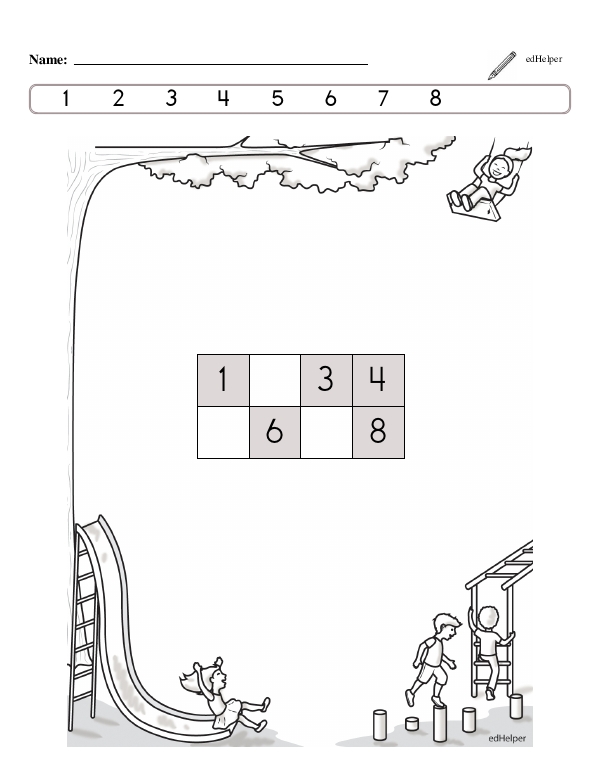
Each worksheet page features a grid of numbers with blanks for students to fill in. Some pages focus on numbers 1 to 10 or 1 to 20. Other pages give students a bigger challenge with large numbers that can begin with any multiple of 10.
For example, one page features a grid with the numbers 50 to 69, while another features numbers 70 to 84. All the numbers in the grid, including the missing numbers, are listed in order at the beginning of the worksheet, giving students the ability to search for any missing numbers they don't know.
Grids are set up in different configurations to give students an extra challenge. For example, one grid might have four horizontal boxes while another has five. Students have to think carefully about which numbers to put in the first and last columns, as the numbers may not end in 0 or 5.
Each page features an image that students can color when they're done. A few examples include a fire truck, a goldfish aquarium, and a castle.
Students learn number order, they can identify patterns, and they enhance their counting skills when they fill the numbers into a hundreds chart. You can target specific skills and grade-level abilities by modifying the chart.
For example, you might include a chart that starts with 0, 1, or a larger number, like 70, to help them discover patterns and challenge their counting skills.
Create charts with different numbers of columns. For example, a grid with three columns can help students learn how to count by threes, while a grid with five columns can help students identify the pattern when counting by fives.
You can also have students fill in empty boxes with other numbers already filled into the grid. You can ask comprehension questions about what the numbers they filled in have in common, like that they are all even numbers or they all end with the same number.
Fill the Missing Numbers in a Grid
Fill the Missing Numbers in a Grid
GRADES:

Additional Educational Resources:
Numbers to 100 Large Workbook - (Grade 1)
Shapes and Patterns Large Workbook - (Grade 1)
Quick Assessment Pattern Playground - Numbers Sequences with Numbers 10 and below and Picture Patterns